
Welcome to virtual world activities.
Please download the software before running it.
- Download the EurekaWorld Viewer ZIP file from the link below
- Open the ZIP file and install the EurekaWorld Viewer software
(If you see an “unknown advertiser” message it’s fine – the software will not harm your computer) - Launch EurekaWorld Viewer software. Once it has opened, close it
- On the day of your activity, you will receive a username and password. Activate EurekaWorld Viewer Enter your username and password and click Log In.
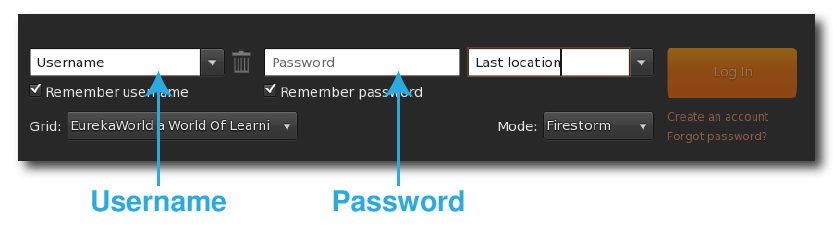
- That’s it. You aready to log in!
Download Links
Installation FAQs
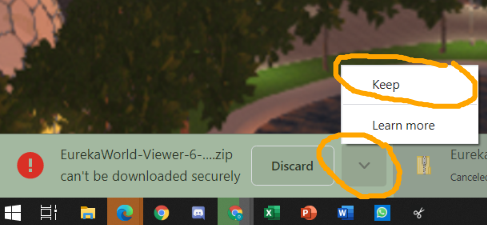
An error message appears while downloading the software
- Select the save option when downloading and not activating
WinRar or another program is asking for payment
- Ignore the payment requirement and simply drag the file out of the compressed folder
A blue window appears that prevents the installation process from continuing
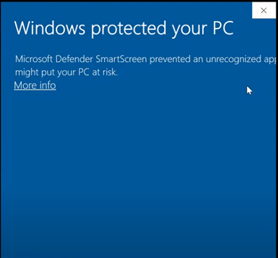
- Choose More info.
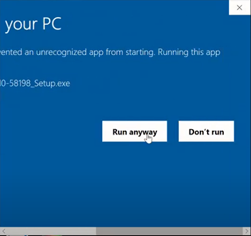
- Choose Run anyway.
Login Failed – Incorrect username or password
- Make sure there is an active internet connection
- Your username and password are case sensitive in English
- Using copy/paste sometimes adds hidden marks. Try typing your username and password instead.
Old or outdated video card
- Update your video card driver (usually requires the help of a support technician)